
PrimeVault Logo

PRIME VAULT

Personal Safe

Your Personal Finance Ledger

Track your income, expenses, and all accounts in one place. Multi-currency, debt tracking, and detailed reporting.

Your Personal Finance Ledger

What do you do with Prime Vault?

Manage your personal finance at a professional level. Keep track of every penny.

01
MAIN MODULE

Income & Expense Tracking

Record every expense and income by separating them into categories. See clearly where your money goes and where it comes from.

Double-Entry Booking
Every transaction affects both an account and a category. Professional accounting principle.
Customizable Categories
Groceries, Rent, Transportation, Entertainment... Create your own categories.
Merchant & Note
Add detailed descriptions like "Migros - Weekly grocery shopping".
Date Selection
Record transactions retrospectively. Add forgotten expenses later.
02
ACCOUNTS

Multi-Account Management

Bank accounts, cash wallets, credit cards, investment accounts... All your financial assets on a single screen.

Account Types
Cash, Bank, Credit Card, Investment Account, Currency Account.
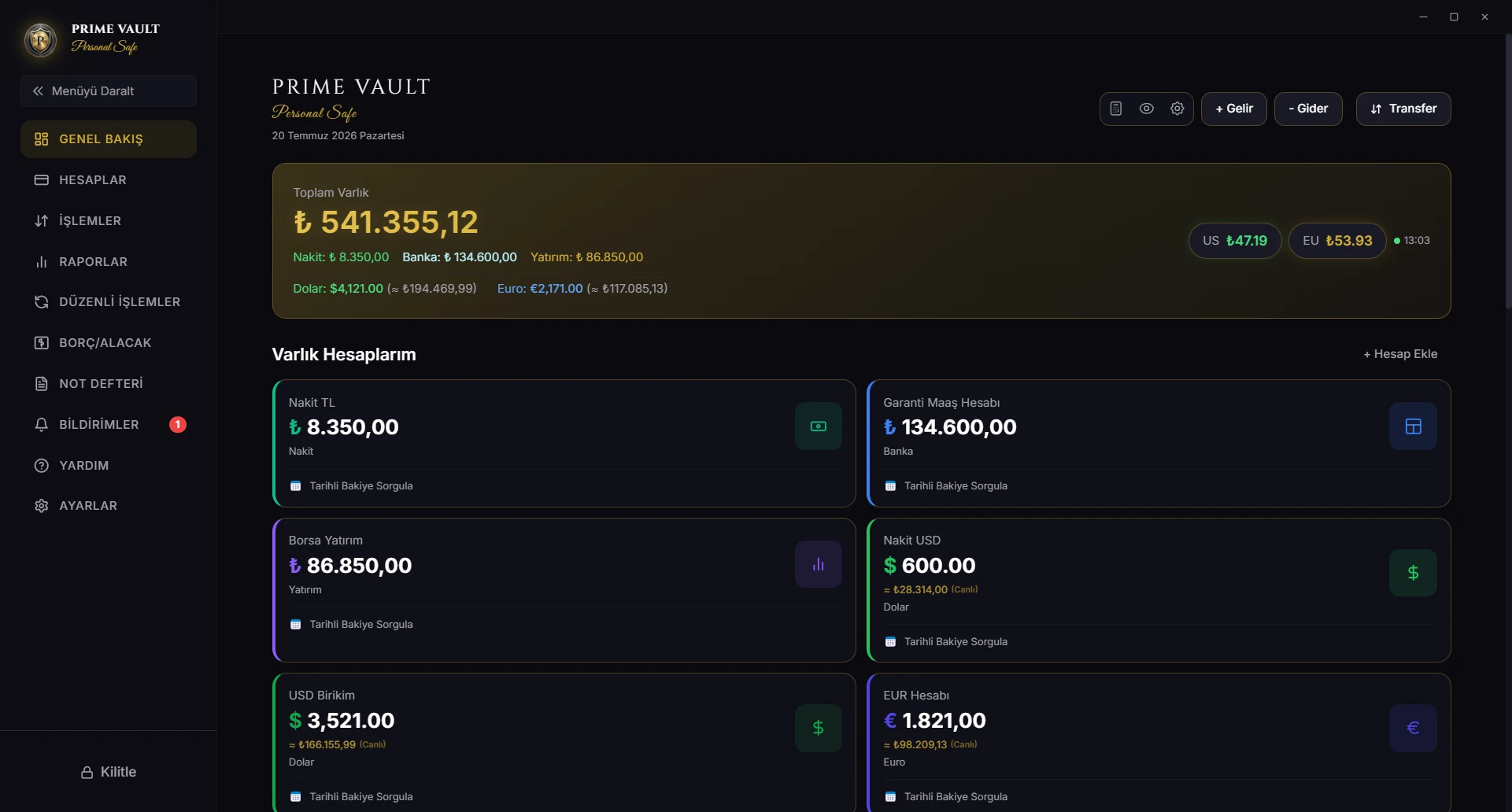
Total Assets
See the instant total of all your accounts.
Credit Card Limit
Remaining limit, amount used, and fullness rate.
Transfer Between Accounts
Transfer money with a single tap, let the system automatically create the transaction record.
03
MULTI-CURRENCY

Multi-Currency Accounts

Track TRY, USD, EUR, GBP, and gold-denominated accounts in one vault. Each account keeps its balance in its own currency.

Live Exchange Rates
Daily updated USD/TRY and EUR/TRY exchange rates with CBRT data.
Instant TL Equivalent
The TL value of your foreign currency assets is automatically calculated.
Cross Rate Transfer
The system automatically calculates the exchange rate difference in TL → Dollar or Euro → TL conversions.
Historical Cost Principle
Past transactions do not change even if the exchange rate changes. The rate on that day is sealed.
04
SMART RECONCILIATION

Debt & Credit Tracking

Who do you owe, who owes you? Even foreign currency debts are tracked with the current exchange rate.

Person-Based Tracking
Debt/credit card and payment history for each person.
Partial Payment
When you pay installments, the remaining debt is automatically updated.
Foreign Currency Debt
If you lent $100, that debt is tracked in dollars.
Smart Closing
When payment is received in a different currency, the system silently performs FX conversion.
05
PROFESSIONAL

Detailed Reports & Charts

Visualize your cash flow. Create and export reports in accounting standards.

Monthly Summary
How much did you earn and spend this month?
Category Analysis
See what you spend the most money on.
Trend Charts
Track your 6-month income-expense trends.
PDF & Excel Export
Export your reports in professional formats.
06
AUTOMATIC

Recurring Transactions

Rent, internet, salary, Netflix... Define your regular payments, let them be processed automatically in the ledger every month.

Flexible Period
Choose daily, weekly, monthly, or yearly repeats.
Smart Reminder
Get notified when the payment day approaches.
Offline Simulation
Even if the device is turned off, past payments are automatically processed when opened.
Dynamic Exchange Rate
Foreign currency payments are calculated with the exchange rate of the day they are processed.
07
PREMIUM

Investment Valuation

Track your portfolio not only with live rates, but with real value gains. Manage your own assets, not the market.

Live Rates & Valuation
Live rate shows the instant picture, while valuation shows your historical photo.
Historical Snapshot
Track your development by saving the value of your investments at specific moments.
Analysis Layer
Your ledger records do not change; valuation is only for analysis and performance tracking.
Real Gain
See the real value increase adjusted for exchange rate differences.
08
PORTABLE

Secure Backup & Export

Keep control of your financial records with encrypted backups and standards-friendly report exports.

Encrypted Backup
Create portable backups of your local vault.
PDF Reports
Turn selected periods into readable PDF reports.
Excel Export
Export records to Excel for further analysis.
Local Control
Use core record keeping and backup features without a cloud account.

WINDOWS · OPEN SOURCE

A financial control center for Windows

A local-first data model, focused desktop experience, and optional encrypted synchronization.

Windows Edition

Windows

Full-featured financial control center on your desktop. Perform detailed analysis on the big screen, manage bulk transactions.

  • Detailed Transaction History: Filter and search all your income and expenses. Find among hundreds of transactions in seconds.
  • Visual Charts: Monthly income-expense trends, category distributions, and account-based analysis.
  • PDF & Excel Export: Export your reports in professional formats. Share with your accountant.
  • Live Exchange Rates: CBRT rates are updated instantly. See the TL equivalent of your Dollar/Euro accounts.
Prime Vault Desktop Preview

ARCHITECTURE

Professional Financial Infrastructure

Built around consistent records, traceable corrections, and double-entry bookkeeping principles.

Double-Entry Bookkeeping

Every transaction is written in two places: where the money comes out and where it goes.

Example

100 TL market expense → 100 TL is removed from Cash account, 100 TL is added to Groceries category. Thus, where your money goes is always traceable.

Immutable Records

No recorded transaction is deleted or changed.

Why?

Made a mistake entering expenses while waiting at the register? The system creates an "adjustment entry". The original record is kept as a document. Your financial history cannot be manipulated, it always remains correct.

History Preserved

The dollar rate is 35 TL today but you bought at 32? That record is kept with 32 forever.

Why?

Your past records do not change because the exchange rate changed. The reality of that day is preserved. "Historical Cost" principle. Your financial history is sealed.

All or Nothing

A transaction written to the database either takes place completely or is not written at all.

Why?

Transfer steps are applied within a database transaction; if one step cannot complete, the related changes are rolled back.

Exchange Difference Tracking

When you exchange dollars, your gain or loss is tracked in the same account.

Example

When you bought $100, the rate was 32, you sold at 35. The 300 TL difference is recorded as "Exchange Gain". Know how much profit/loss you made from foreign exchange transactions.

AES-256 Data Encryption

Your data is encrypted with AES-256. Only you know the PIN.

Why?

Financial content is encrypted on the device before optional synchronization and is transferred to the service infrastructure in encrypted form.

SECURITY & PRIVACY

What Prime Vault is NOT?

In the age of data collection industry, we define ourselves by what we refuse to do.

Local Computation

Core financial calculations run on your device; optional sync and backup use separate online services.

No Analytics

We do not use Google Analytics, Facebook Pixel, or any tracking code.

No Cookies

No tracking cookies in the application.

No Email Collection

No newsletters, registration forms, or email lists. We do not do marketing.

No Ads

The current version does not display advertising.

No Cloud Silos

No AI analysis, cloud processing, or "smart recommendations". Your data is yours.

AES-256 Data Encryption

Supported financial content is encrypted on-device with AES-256-GCM. PBKDF2 is used for key derivation before optional encrypted synchronization.

Cipher EngineAES-256-GCM
Local StorageEncrypted SQLite
Privacy PolicyLocal-First

GALLERY

Application Interface

Sections from desktop and mobile interface.

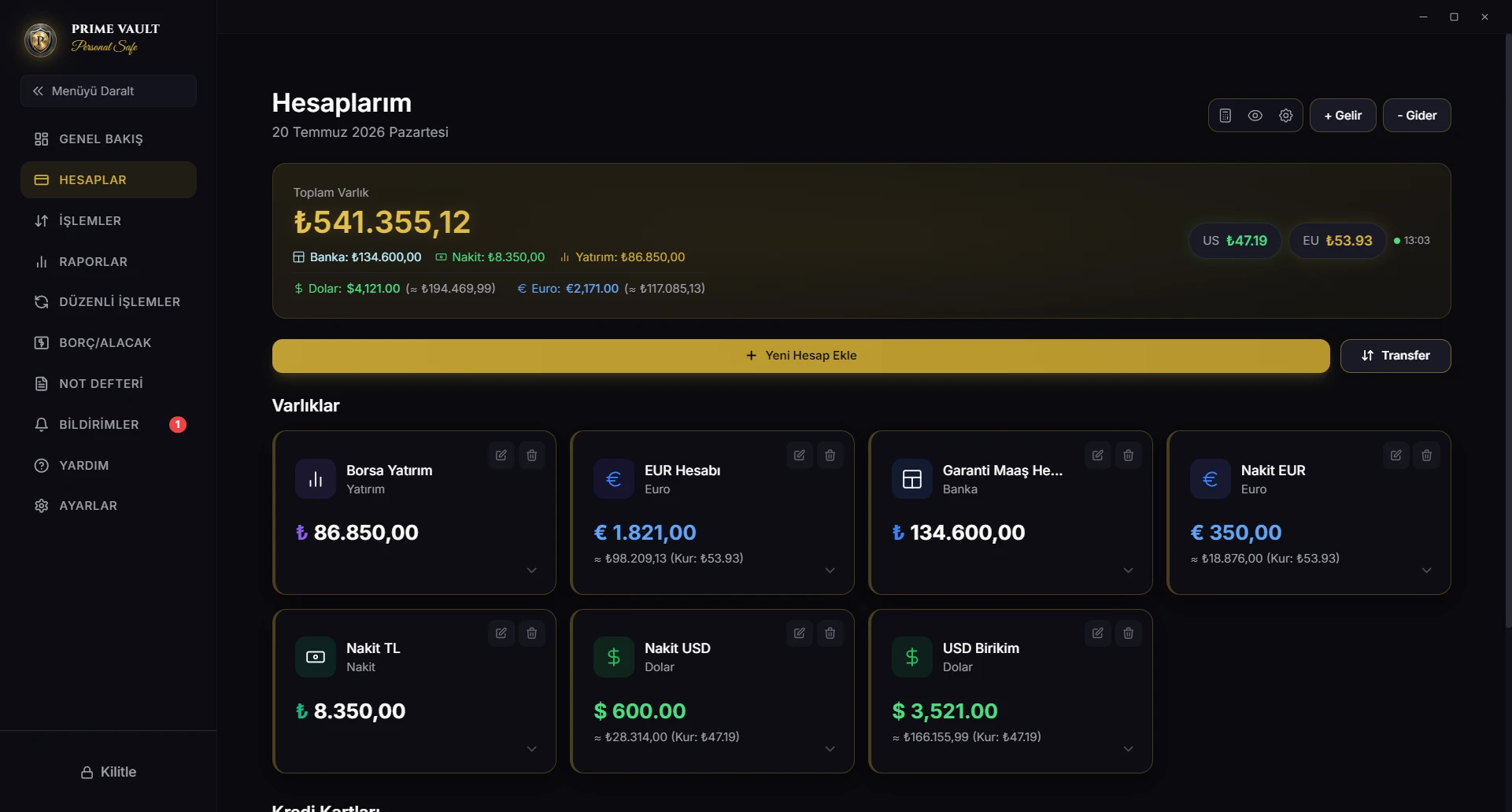
Dashboard
Financial Dashboard
Accounts
Accounts & Asset Management
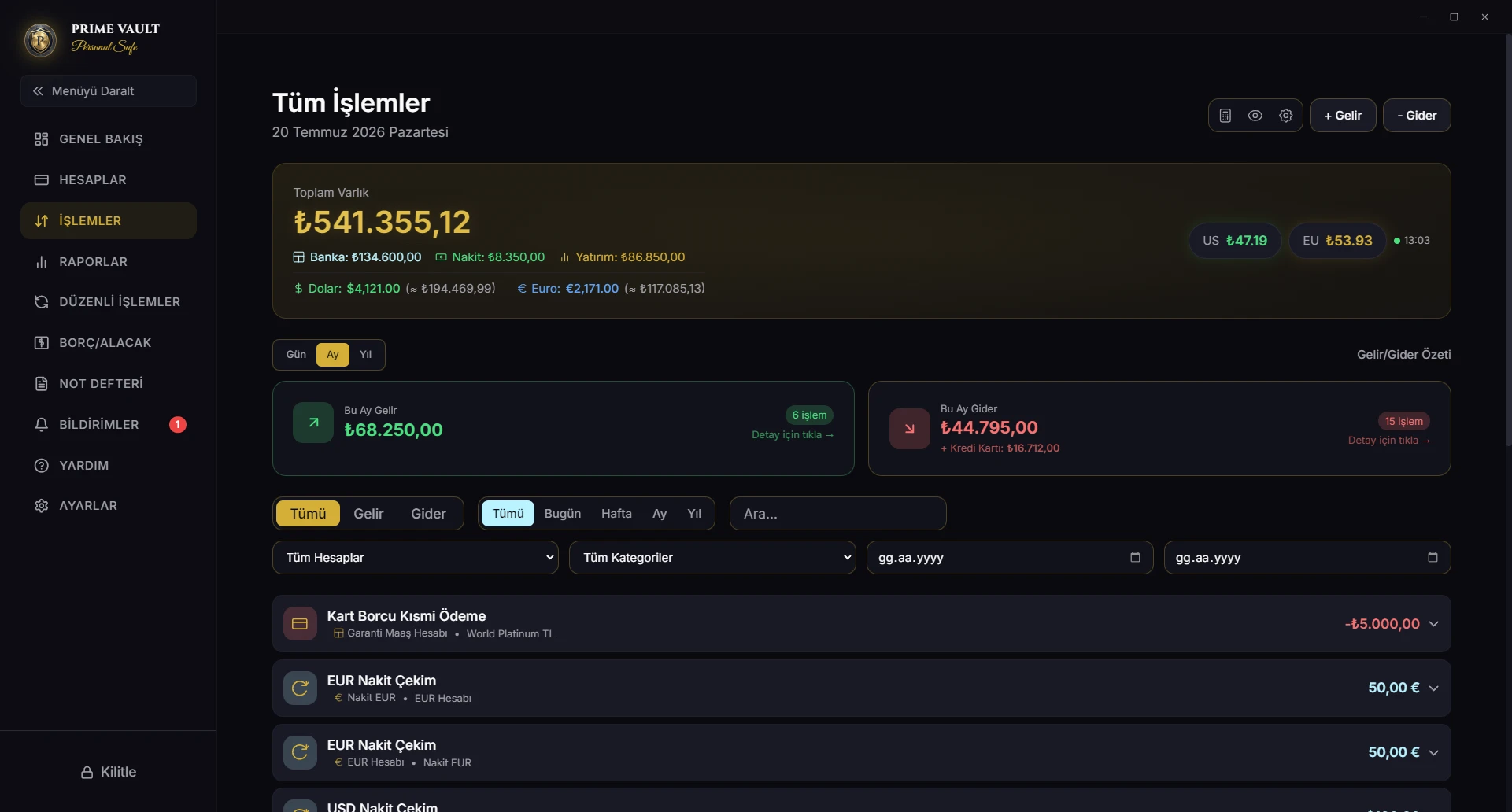
Transactions
Income, Expense & Transfers
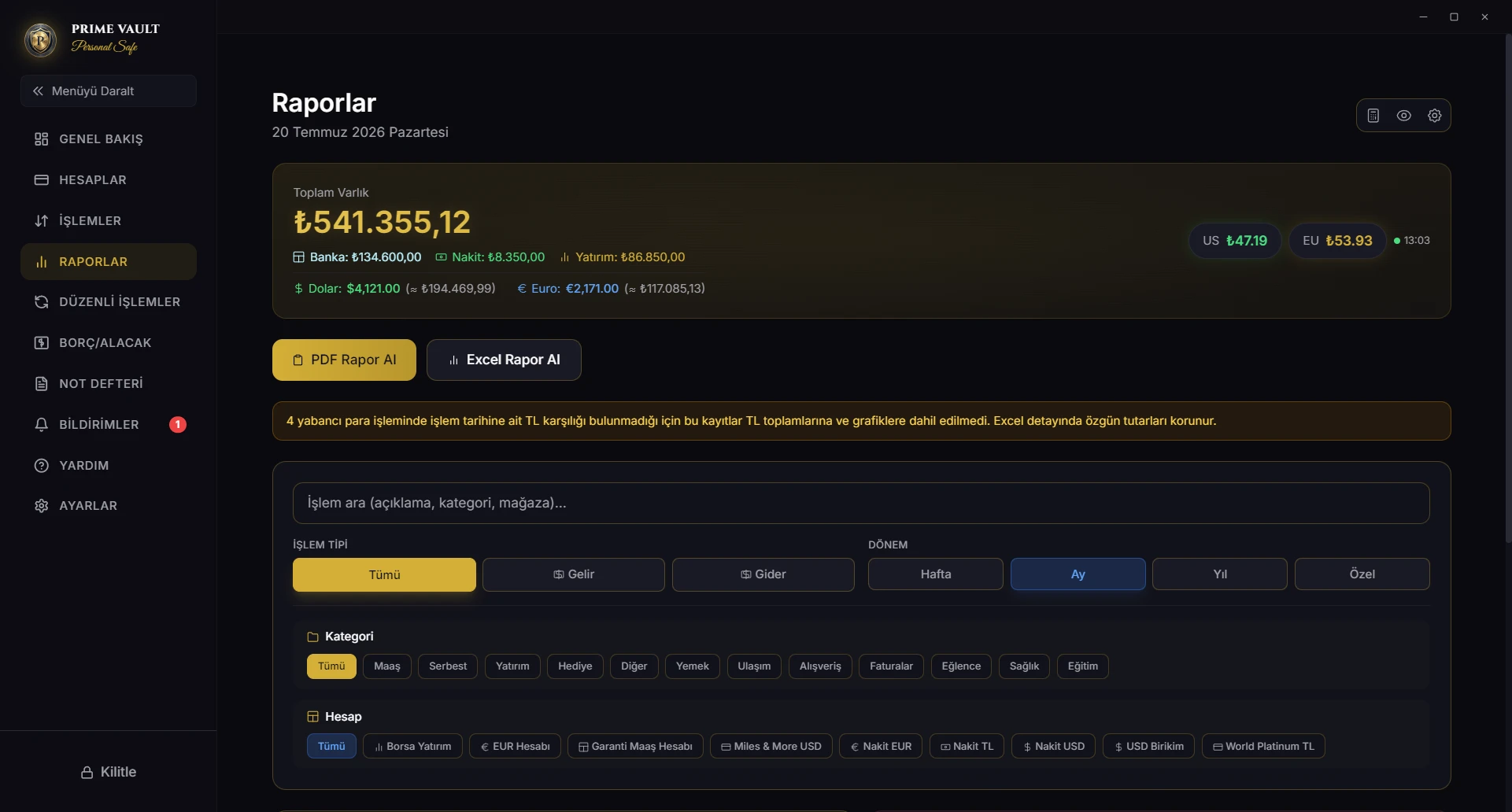
Reports
Reports & Visual Analytics

What Prime Vault is NOT?

In the age of data collection industry, we define ourselves by what we refuse to do.

Local Computation

Core financial calculations run on your device; optional sync and backup use separate online services.

No Analytics

We do not use Google Analytics, Facebook Pixel, or any tracking code.

No Cookies

No tracking cookies in the application.

No Email Collection

No newsletters, registration forms, or email lists. We do not do marketing.

No Ads

The current version does not display advertising.

No Cloud Silos

No AI analysis, cloud processing, or "smart recommendations". Your data is yours.

Our Philosophy

Prime Vault does not manage your financial data for you. It gives you the tools, you manage it. We only provide a safe. You hold the key.

System Constitution v2.5
Logo

PRIME VAULT PERSONAL SAFE

Version: v2.5.0 · Powered by PRIME VAULT

AES-256 Client-Side Encryption

Your data is encrypted with AES-256 on your computer, and with RLS (Row Level Security) protocols in the cloud.